
Open source · Apache-2.0 · Early preview

Your decks, open anywhere.

OpenPresent is an open-source presentation editor for PowerPoint files. Open a .pptx in your browser or on your desktop, edit its text, shapes and slides, present it full screen, and export PDF or PNG. Your file never leaves your machine.

No sign-up, nothing uploaded Web, macOS, Windows, Linux Star it on GitHub

z7753256-cdif-en.pptx Slide 1 of 5
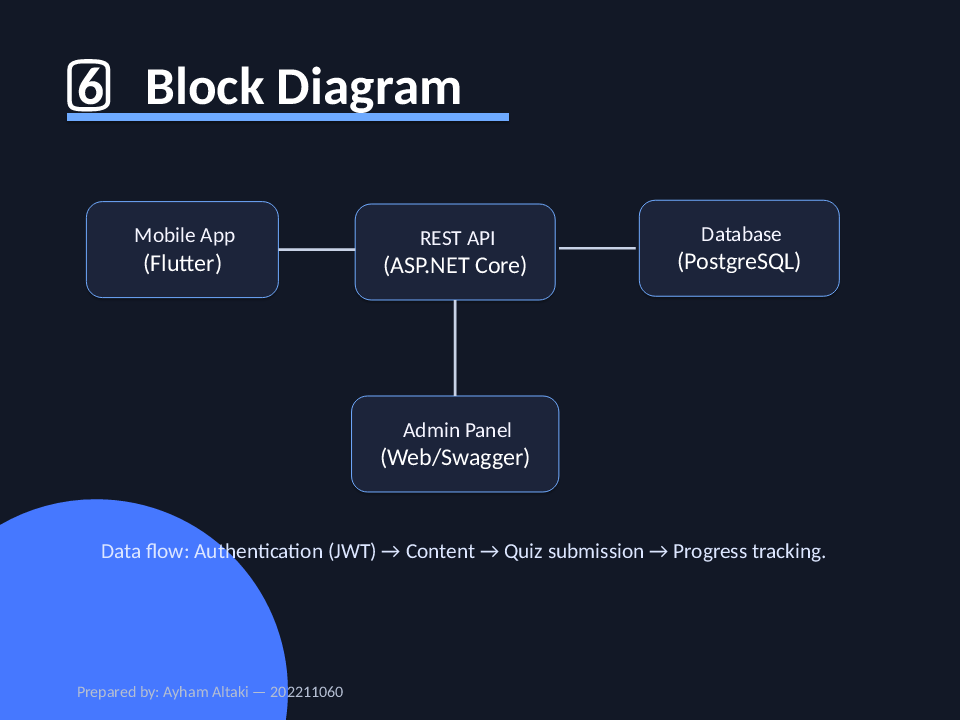
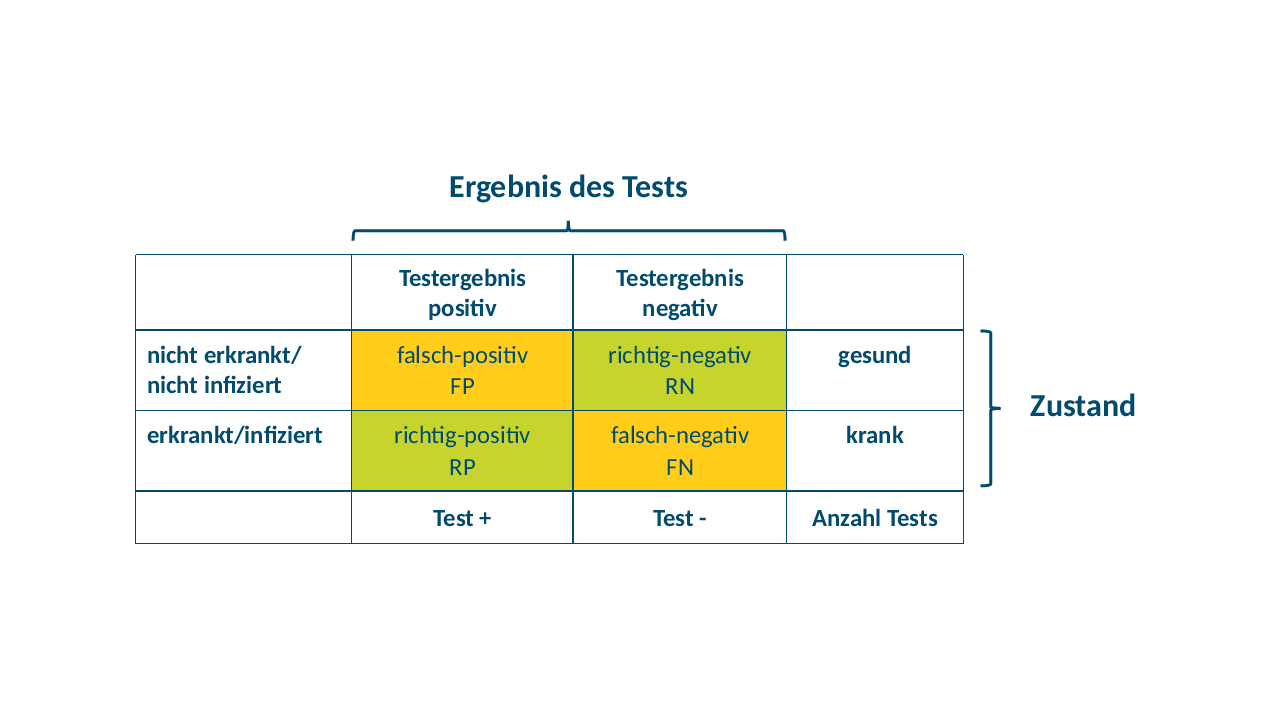
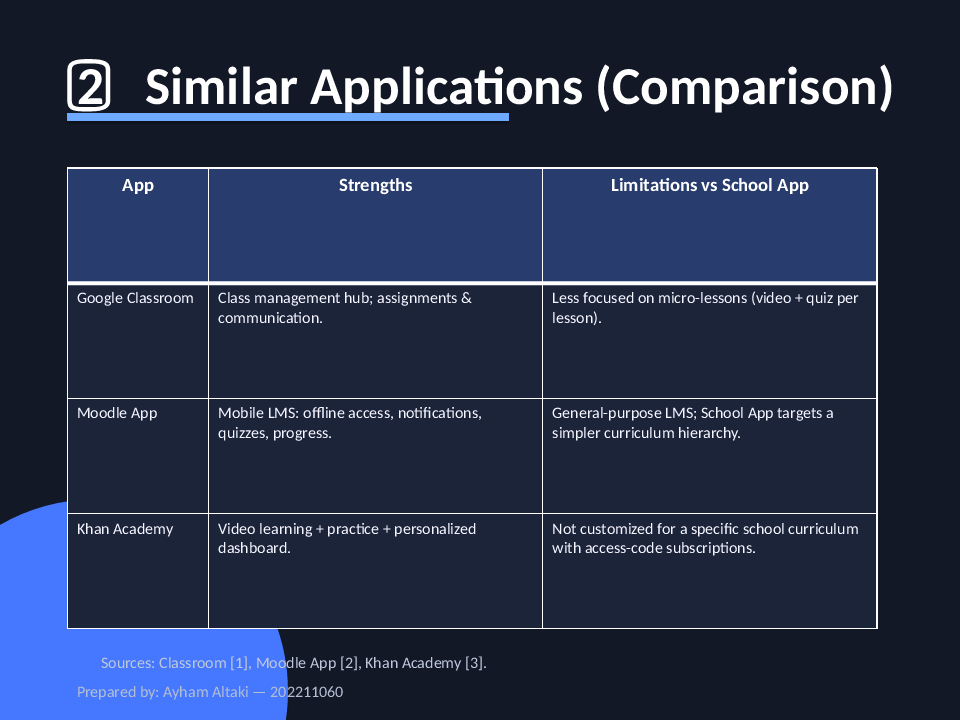
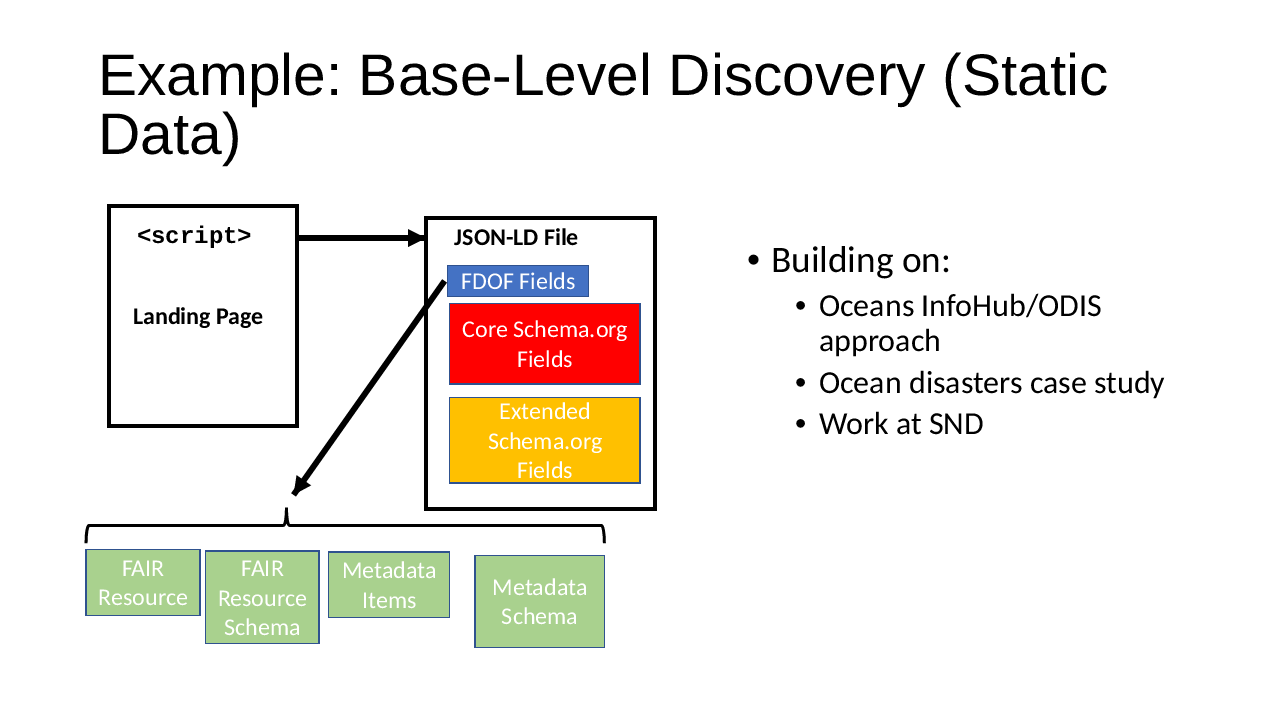
The title slide of an English deck from the test corpus, as OpenPresent draws it A block diagram on a dark theme, as OpenPresent draws it A German slide with a coloured table on diagnostic tests, as OpenPresent draws it A comparison table on a dark theme, as OpenPresent draws it A slide with a diagram of boxes and connectors, as OpenPresent draws it
Real slides drawn by OpenPresent's renderer when this site was built, from three CC BY decks in our test corpus. Not mock-ups; credits below.
66real decks written by PowerPoint open and save with every XML part byte-identical
187preset shapes, every one the format defines, with the same geometry on every platform
8,739elements, attributes and values of the format, each tracked as a row
0macros run, and nothing fetched from the network

01 What it does

Open, edit, present, export. In the open.

A presentation editor with the ribbon and shortcuts you already know, over an engine whose first job is to keep your file intact.

.pptx .pptm .potx engine What was opened Slides and text Shapes, pictures Tables, charts 1 part kept as is 0dropped
.pptx · .pptm · .ppsx · .potx

Opens your decks. Never drops anything quietly.

Shapes, text, pictures, tables, charts, SmartArt and themes are read into one model. Anything the model does not hold yet is kept byte for byte, and what a slide uses that is not drawn yet is named, feature by feature.
.pptx Opened 2 repairs, each named
Recovery

Opens damaged decks.

A truncated archive, broken XML or a missing content-types part gets the best reading we can make, and the deck opens. Hostile content is neutralized rather than obeyed; only a file with nothing readable in it is refused, naming why.

Quarterly review B I U
Edit

Edit text, shapes and slides.

Click into a text box and type, with bold, italic, underline and undo. Move, resize, rotate and delete shapes; add slides, text boxes, shapes and pictures; change the theme and slide size.

NEXT04:12 F5 present from the start
Slide show

Present it.

Full screen from the start (F5) or the current slide (Shift+F5), with PowerPoint's keys. Presenter View shows the next slide, your notes and a timer.

deck PDF PNG · 1920 px
PDF · PNG · .pptx

Save and export.

Save gives back a .pptx: parts you did not touch come back byte for byte, and an edit patches only what changed. Export a PDF with real, searchable text, or a slide as a 1920-pixel PNG.

…/openpresent/editor.html In your browser macOS · Windows · Linux
Web · desktop

In the browser, and a desktop app too.

The same editor in a native window for macOS, Windows and Linux. Open a deck from the Open panel, or double-click a .pptx; no network needed. The desktop builds are early, unsigned previews.

checks pass Apache-2.0unsafe: forbiddenparsers: fuzzed
Apache-2.0 · Rust · no telemetry

Open source, all the way down.

The engine, the editor and the desktop shell are on GitHub. unsafe is forbidden, every parser is bounded and fuzzed, and coverage of the format is measured row by row.

Read the source

02 Private by design

Your deck never leaves your device.

The engine is compiled to WebAssembly and runs inside your browser, or inside the desktop app. There is no server to send a deck to: opening, drawing, editing and exporting all happen on your machine.

Your browser or desktop
  1. your .pptx
  2. engine · WebAssembly
  3. edit · present
  4. .pptx · PDF · PNG
Nothing goes out.

No upload, no account, no telemetry. Macros are never run, and links inside a deck are never fetched.

The editor

A ribbon you already know.

PowerPoint's tabs, groups and shortcuts, with every command it has present. What this build cannot do yet is shown disabled, with the reason in its tooltip, rather than faked.

OpenPresent · editor.html
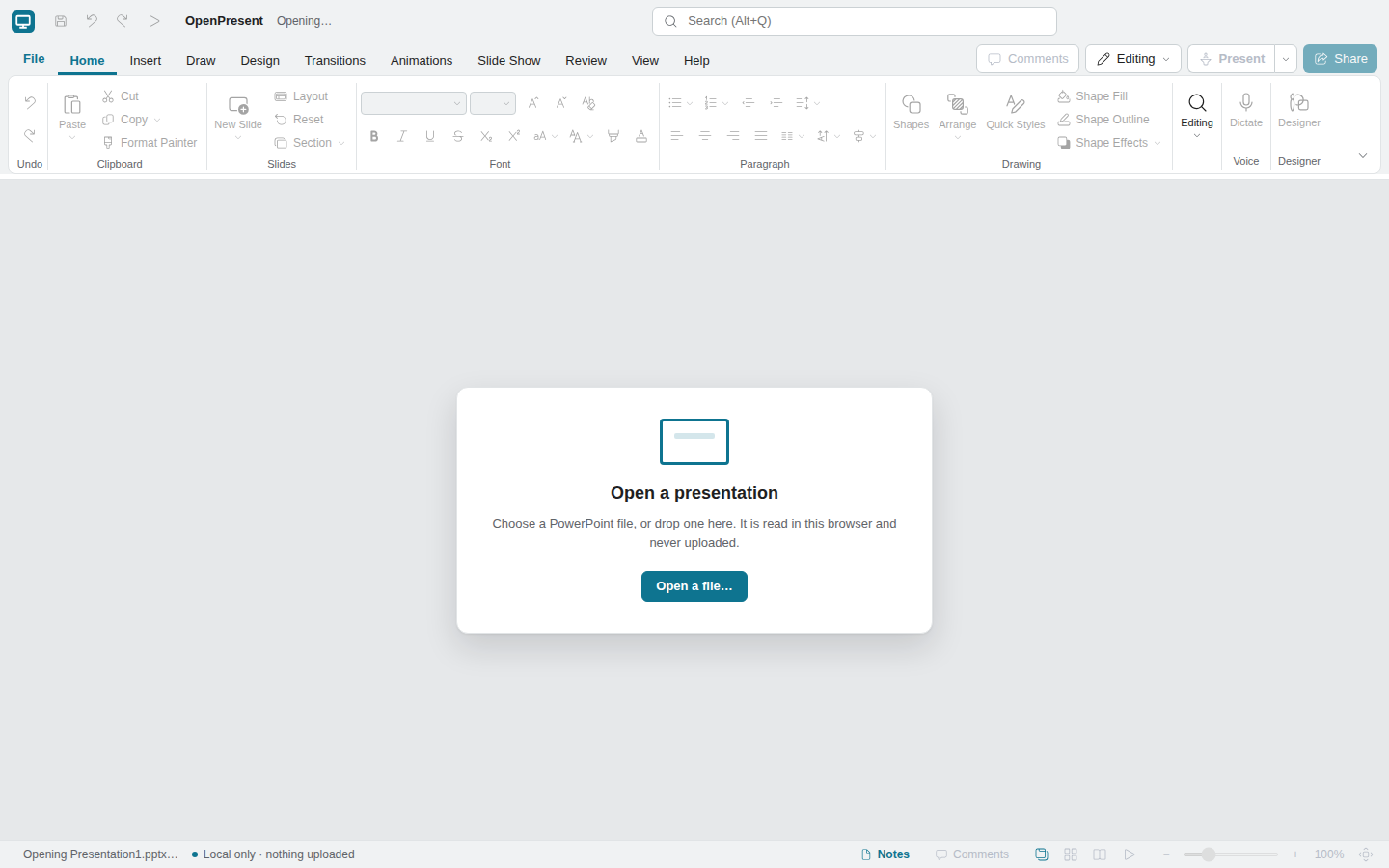
The OpenPresent editor in a browser: the ribbon, the slide thumbnails, a blank title slide and the status bar
A screenshot of the editor taken by Chrome on our CI when this site was built.

03 Real renders, not mock-ups

Slides drawn by our own engine.

Each picture is a slide of a real deck, drawn by OpenPresent's renderer when this site was built. The slide gallery shows every slide of every deck beside LibreOffice's rendering of the same file, so you can judge the difference yourself.

A German slide on diagnostic tests, as OpenPresent draws it
Bernd Röhrig, Diagnostischer Test: 4-Felder Tafel, doi:10.5281/zenodo.17310490, CC BY 4.0.
A slide with a diagram of boxes and connectors, as OpenPresent draws it
Arofan Gregory, Functional Breakdown and High-Level Recommendations, doi:10.5281/zenodo.7753256, CC BY 4.0. Also our sample deck.
A block diagram on a dark theme, as OpenPresent draws it
Tarek Barhoum, education platform, doi:10.5281/zenodo.19828779, CC BY 4.0.

The slides at the top come from these three decks. The decks are unmodified and keep their own licences; the full list is in fixtures/real. The reference beside them in the gallery is LibreOffice, not PowerPoint: until our output has been checked against PowerPoint itself, nothing here claims to match it.

04 Shipping now

What works today

A list of what the editor does now, not a roadmap. It is an early preview: what is still to come is under Honest status below.

Open

  • Pick a file, or drop it on the window
  • .pptx, .pptm, .ppsx, .ppsm, .potx, .potm
  • Damaged decks get a best reading
  • What a slide leaves out, listed by feature

Edit

  • Type into text, with bold, italic, underline
  • Move, resize, rotate and delete shapes
  • New, duplicate, hide and reorder slides
  • Text boxes, shapes, pictures; themes and slide size

Present

  • From the start (F5) or this slide (Shift+F5)
  • Presenter View with notes and a timer
  • Transitions shown as fades
  • Black and white screens, jump to a slide

Save and export

  • Save a .pptx, patching only what changed
  • Create PDF: every slide, with searchable text
  • Export the current slide as PNG
  • Undo and redo every edit

Not yet. Co-editing, autosave, animations in the slide show, editing tables and charts, and comments. The ribbon already shows those commands, disabled, so you can see where each will be.

05 Where it fits

Open source, in the browser, and private.

Most ways of opening a deck ask you to install a suite or to upload the file to someone's server. OpenPresent does neither, and it is honest about being younger than both.

Kind of tool
Runs in a browser
File stays on your device
Open source
Desktop app
Mature, complete
A desktop office suiteinstalled on your computer
No
Yes
Varies
Yes
Yes
A cloud slides serviceedited on the provider's servers
Yes
No
Rarely
Varies
Yes
OpenPresentone Rust engine, web and desktop
Yes
Yes
Yes, Apache-2.0
Yes, preview
Not yet

Kinds of tool, not products. OpenPresent is an early preview: it has fewer features than a mature suite today, and its output has not yet been checked against PowerPoint.

06 Self-hosted

Put the editor on your own site.

The editor is static files: HTML, JavaScript, CSS and one WebAssembly engine. There is no server component, because a deck is opened and drawn in the visitor's own browser and never sent anywhere. Any web server, or any static host, will do.

terminalwasm-pack
# build the engine into the editor's folder
$ wasm-pack build crates/casual-slide-wasm --release \
    --target web --out-dir ../../webapp/pkg
# then serve webapp/ from any web server
$ python3 -m http.server -d webapp 8080
No server code

Nothing to run, patch or scale beyond serving files.

Your network only

No document leaves the browser, nothing phones home, no licence check.

Strict CSP

The page carries its own Content Security Policy; the guide lists what a header must allow.

07 Honest status

Where it is, and what's next.

The file engine came first: reading, modelling and writing a deck without losing anything. Now it ships in thin slices you can use, each deepened in later passes.

  1. Phase 1
    Model, import and export
    Bounded reading of the package, the whole format modelled, recovery of damaged decks, and a writer that patches only what changed. Every tier is closed.
    Tiers closed
  2. Slices 1–8
    View, desktop, save, edit, present, build slides
    The browser editor and the desktop app; Save, PDF and PNG; typing and formatting with undo; moving and resizing shapes; the slide show and Presenter View; new slides, shapes and pictures. Built and usable, each still being deepened and tested in more browsers.
    Early preview
  3. Next
    Autosave, animations, rich objects, design
    Autosave so a crash loses nothing, animations in the slide show, editing table cells and chart data, and the rest of the Design tab.
    Next
  4. Later
    Co-editing, and a check against PowerPoint
    Real-time collaboration on a server you run. Before any release, our output is checked in PowerPoint itself; until then, nothing claims to match it.
    Planned

08 Questions

Frequently asked

Is OpenPresent free?

Yes. It is open source under the Apache-2.0 licence: free to use, to change and to host yourself, with no account and no licence check.

Is my presentation uploaded anywhere?

No. The engine runs as WebAssembly inside your browser, or inside the desktop app. The deck is read from the file you pick and never sent to a server, and the site loads no trackers and no third-party scripts or fonts.

Which files does it open?

.pptx, .pptm, .ppsx, .ppsm, .potx and .potm: the Office Open XML formats PowerPoint has saved since 2007. The older binary .ppt format is not read.

Does it look exactly like PowerPoint?

We do not claim that. Our renders are compared with LibreOffice's in the public slide gallery, and some features are not drawn yet; each slide names what it leaves out. Before any release our output will be checked in PowerPoint itself.

Will saving change my file?

Saving a deck you have not edited gives back the same bytes. When you edit, only the parts you changed are rewritten, node by node; everything else, including what OpenPresent does not model yet, is kept as it was.

What about macros?

Macros are never run. A .pptm opens, and its macro project is kept in the file untouched, so saving does not strip it.

Can I use it offline?

Yes, with the desktop app for macOS, Windows and Linux. Today the builds are early, unsigned previews made by our CI; the download page explains the one-time step each system needs.

How can I help?

Try your own decks, and when one opens wrongly, open an issue with the file if you can share it. A star on GitHub helps others find the project.

Open a deck and see it.

No sign-up, no upload, no install. Bring a .pptx, or try our sample, then edit it, present it and export it.